Saturday, November 21, 2020

Eaglenomics – The best of the Left, the best of the Right

Eaglenomics – The best of the Left, the best of the Right
Where did this come from....go to?
https://eaglenomics.com/

Eaglenomics – The best of the Left, the best of the Right

START HERE: Bring Home the Factories and Jobs by Either Creating a Revenue Neutral Value Added Tax, or Exiting the WTO and Adding Tariffs.

Every industrialized country in the world has a Value Added Tax which acts like a trade tariff. Except the United States, which stands alone in not having a VAT. Lacking a VAT puts manufacturing in the United States at a huge disadvantage. It sends factories and jobs out of the country. The only way to get them back is to institute its own VAT.

Or, the US could exit the World Trade Organization (WTO) and implement a system of import tariffs. This always brings-on trade wars with other countries. The recently implemented US tariffs are not allowed under WTO rules. These have resulted in the expected retaliatory tariffs of the current trade war.

The United States developed into the world's greatest industrial power with the most prosperous middle class by promoting and protecting American industries and American jobs. Joining the World Trade Organization and abandoning our sovereign policy of import tariffs has led to massive unemployment, underemployment, and a decreased standard of living. Import tariffs are the only proven way to cause domestic industrial investment and prevent the siphoning-off of the assets and wealth of the nation. The greatest loss of prosperity and assets occurs in the middle class. Restoring the import tariff system will rapidly restore the economy of the United States and the prosperity of the middle class.

The reason for the implementation of the World Trade Organization and the so-called policy of "Free Trade" is to allow multinational corporations to outsource production and pocket the extra profits that come from the seemingly lower costs in other countries. But this "Free Trade" isn't free at all. The costs of these extra profits are extracted from the Middle Class and Poor of the United States. But, it is even worse than that.

There is a simplistic and fallacious argument that the outsourcing of jobs is justified because labor costs are less in the outsourced foreign countries and that the people of the United States are getting lower cost products and services. This argument is utterly false. They actually cost us MORE than domestically produced products and services. The products only appear to cost less because they do not include all of the hidden costs that we must pay to subsidize the foreign production and extra profits. The Hidden costs include the loss of jobs, the downgrading of the quality of jobs, the loss of revenue to the ancillary and service businesses, and the loss of opportunity for Americans to start small businesses in the USA. Each of these is paid for by all Americans. When a job is lost, the unemployed person does not magically disappear. They are still living and consuming resources from other Americans by getting Welfare, unemployment benefits, help from friends and family, or engaging in crime—which raises the costs of policing, the judicial system, prisons, and the actual damages caused by their crimes. There are also the costs due to increased drug and alcohol use, and added health costs from the increased stress of not having a job.

We hear that we are now in the age of globalization and must adjust to these new realities of free global trade. This is not true. There is nothing new about it. We have had widespread and heavy global trade for at least 400 years—going back to about 200 years before the founding of the United States.

This same "Free Trade" scheme was used to decimate the middle classes of each of the previously strongest national economies of the Netherlands and Great Britain.

Making It Work for Both Sides

• Bring Back the Off-Shored Manufacturing Jobs
• Eliminate Unemployment
• Create Low-Cost Non-Fossil Sustainable Energy
• Increase Industrialization
• Develop an Advanced National Infrastructure
• Expand the Middle Class
• Create Enduring Prosperity
• Restore the American Dream

Optimize the Left and the Right

Just as birds fly best with two healthy wings, economies function best when simultaneously utilizing both the left and right wings of economics. It is disastrous to exclude half of the economic tools. It is also pathetically ineffective to compromise in the middle. But this is the typical solution to resolving the differences between the Left and the Right.

The Best of the Left and the Right

Eaglenomics is a groundbreaking advance in the field of economics which has determined that the best results come from combining left wing economics, right wing economics, the business free market, and government programs. These are implemented with a corrected application of the fiat monetary system which unshackles the economy for maximum employment, production, standard of living, and national financial health. Eaglenomics has determined how to combine the extremes in a way that produces a much greater outcome than prior economic approaches.

Eaglenomics includes restoring development policies that were implemented early in the history of the United States. These policies were put in place to cause the industrialization of the United States. At that time we imported industrial goods and exported raw materials. It was not possible to compete with cheap European manufactured goods because their wages were much lower than ours and their industrial base was already built-up. Global trade was destroying our ability to advance our economy and standard of living. To counter this, we implemented a series of heavy import tariffs to allow domestic manufacturing to compete with European manufacturing.

Because we have abandoned the tariffs that created our industrialization and wealth, we have been losing those industries to countries with lower labor rates. It is not possible to stop this slide into impoverishment without restoring the policies that protect our industrial base. Eaglenomics will restore the growth policies in a manner that works with the rules of the World Trade Organization and with today's political realities.

In the more than 50 years that have transpired since the 1960's, tremendous advances have occurred in science and technology. We should be seeing a huge rise in the standard of living, yet the new generaChangetion is facing ever more difficulty in achieving a modicum of their parent's and grandparent's standard of living and security. The current economic approach has not converted these knowledge advances into an overall improvement. With a shrinking middle class, disinvestment, de-industrialization, and massive unemployment, it is time to look to a new economic paradigm.
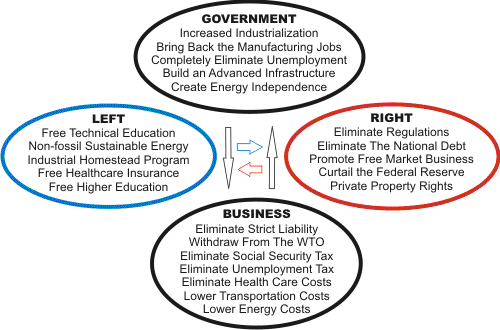
Model 8Under the innovations of this new economic system, we will see the virtual elimination of unemployment and poverty; drastically reduced fuel costs; free advanced education; free health insurance; drastically reduced crime and incarceration rates; the rapid re-industrialization of the nation; the rapid expansion of the middle class; the restoration of upward mobility; increased opportunity in business; and a secure and abundant Social Security retirement system. As we examine each area's improprieties, the potential for colossal improvement should be glaring.

Eaglenomics utilizes the best economic tools from both the liberal and conservative sides (the Left and the Right), and also from the government sector and the business sector. Simultaneously using the best economic tools from each of these areas creates the best solutions.

THE GLOOM AND DOOM FALLACY

You've been told that the United States is doomed: that we've mortgaged the future of several generations of Americans due to the national debt; that we can't compete; that there's no hope of restitution. But, these are merely the result of failed economic knowledge and policies. Correcting the economic deficiencies that suppress prosperity will unleash the tremendous capabilities that have built up with the advancements in science and engineering over the past several decades.

THE WAY TO FREEDOM, STRENGTH, SECURITY, AND PROSPERITY

Money is not economics and the economy is not money. The real economy is jobs, production, infrastructure, food production, and the other goods and services that determine the standard of living. Money is nothing more than a simple accounting device that is used during the exchange of goods and services. Economics is the understanding of that real economy. The mainstream understanding of economics is woefully inadequate for designing and managing the real economy. Eaglenomics is a huge step forward in providing the tools to efficiently and effectively marshal the resources toward building a prosperous nation at every level.

It is necessary to introduce economic policies which correct both the errors of the Left, and those of the Right. The approaches of each of these positions have become destructively distorted. A lack of workable economic tools has led to fallacious corrective programs which have not achieved acceptable and sustainable results. The current clashes between liberal and conservative political positions have further led to contradictory and destructive economic policies.

Since the Eaglenomics approach is not trapped in either the liberal nor conservative political camps, it is free to choose the best economic policy mechanisms for each facet of every issue. Stellar economic advances will be realized for Americans as the system takes advantage of fitting the proper solution to each problem by simultaneously drawing from both liberal and conservative mechanisms. Another advantage of not being ideologically biased or constrained is that it allows the creation of a government that exists on a balanced common ground which will bring all sides together. The current entrenched political positions are needlessly polarizing and have caused a destructive disunity in the United States.

The following goals might seem to be overly ambitious, mutually exclusive, and financially unaffordable. But, not being ideologically constrained, the new approach will allow the use of more policy tools which will achieve superior results. When properly implemented, these goals will work efficiently and symbiotically with each other. By this method we will be able to achieve an economy which brings the greatest prosperity for all Americans, while achieving an unprecedented level of fiscal soundness and stability.

1. Create prosperity and full employment for all.

2. Develop sustainable energy independence.

3. Reverse international trade from deficit to surplus.

4. Restore and advance US manufacturing in all sectors.

5. Revamp and bring coherency to the US tax code.

6. Fix national health care.

7. Restore Social Security to financial health.

8. Enable financially sound local and state government.

9. Reform both Wall Street and the financial sector.

10. Re-design the banking system and make it stable.

11. Structure educational support for all Americans.

12. Eradicate the revenue deficit and the national debt.

13. Strengthen US security.


~A.

Friday, November 20, 2020

Increasing taxes on gasoline: WRONG!

Increasing taxes on gasoline: WRONG!

Increasing taxes on gasoline: WRONG!

CT VIEWPOINTS -- opinions from around Connecticut

Jim Cameron is a great advocate for mass transit and he is always looking for increasing taxes on other businesses to get more funding for mass transit.  The reason is that mass transit costs more to run than the revenue it generates through user fees.  Put a different way, mass transit loses money every single day.

The state of Connecticut had the highest gasoline tax in the entire United States.  What did we find with the investigation about that?  We found that the state actually increased the retail price so high due to the taxes that it actually generated less tax revenue than before the increases.

We also learned — and this was key —  the gas tax revenue was diverted from the intended purposes. Cameron also fails to mention that we now still have the second tax on gasoline called the Gross Receipts Tax which was intended to fund underground gasoline tank leaks. That program is canceled, but the tax remains, generating millions of dollars and are not used for their intended purpose.

Do you see a pattern here?  Taxes, once put in place,  generate million and hundreds of millions of dollars that do not go to their intended purpose and, more importantly, when that intended purpose goes away, the tax remains on us, the taxpayer!

Michael J. Fox is Executive Director of the Gasoline & Automotive Service Dealers of America, Inc.

CTViewpoints welcomes rebuttal or opposing views to this and all its commentaries. Read our guidelines and submit your commentary here.

ABOUT THE AUTHOR


~A.

Thursday, November 19, 2020

American Democracy Was Never Supposed to Work – BillMoyers.com

American Democracy Was Never Supposed to Work – BillMoyers.com

American Democracy Was Never Supposed to Work

The Signing of the Constitution of the United States," with George Washington, Benjamin Franklin, and Thomas Jefferson at the Constitutional Convention of 1787; oil painting on canvas by Howard Chandler Christy, 1940. (Photo by GraphicaArtis/Getty Images)

This article originally appeared in The Nation.

If the United States were a democracy, this election wouldn't have been close. The fate of the world wouldn't depend on a handful of suburban precincts. The winner would have been known immediately. With a comfortable lead well into the millions, the president-elect and his party could have moved on to crafting and passing the program that gained them an undeniable mandate.

But we do not have a democracy, and not because Trump undermined it but because the framers of the Constitution did not create one. They felt the Articles of Confederation left too much power in the hands of economic populists in the states, and so they constructed a system meant to serve and protect the rich. The Constitution was designed specifically to prevent, as James Madison put it in the Federalist Papers, "an abolition of debts" or "an equal distribution of property" from passing into law.

Nearly two and a half centuries on, the antidemocratic provisions of the Constitution are still working as the framers intended. Even in an era of global capital, the wealthy benefit from a sclerotic, dysfunctional government. When early election results suggested a Joe Biden presidency with Republicans maintaining their grip on the Senate, the Associated Press reported that "stocks rallied on Wall Street as investors embraced the upside of more gridlock in Washington." Divided government, these investors seem to think, will derail what Madison called "wicked or improper projects": the abolition of student debt, higher taxes on the wealthy, the Green New Deal.

More than progressive economic measures, however, democracy itself is being thwarted by the Constitution. In the summer of 1787, opposition to rule by the people was one of the few things the delegates in Philadelphia could agree upon. They spent the first few days of the convention reassuring one another of their anti-democratic credentials. Elbridge Gerry of Massachusetts was typical in deeming democracy "the worst of all political evils."

The Constitution they designed included provisions and mechanisms meant to water down the popular will and block a more equal distribution of wealth. The president would be selected not by the people but by an Electoral College whose members would be appointed by the state legislatures. The Senate, with equal votes for every state, large and small, would ensure that citizens of large, populous states had far less influence over legislation and judicial appointments than those in smaller ones. Alexander Hamilton wanted its members to serve lifetime terms, for "nothing but a permanent body can check the imprudence of democracy." Though he opposed giving each state equal votes, James Madison thought the upper house should serve "as a check on the democracy," a way to impede the influence of those who "labor under all the hardships of life, and secretly sigh for a more equal distribution of its blessings."

Far from resolving a decade of paralysis and crisis, the 2020 election has only confirmed doubts about the stability of American democracy, institutions, and the constitutional order. The Democrats' apparent failure to recapture the Senate—assuming anything less than a miracle in Georgia this January—removes the possibility, for the foreseeable future, of steps the party might have taken to offset its structural disadvantages, such as expanding the courts and admitting Puerto Rico and the District of Columbia as states.

Merely ousting Trump is not enough without addressing more fundamental weaknesses in our political system, especially an outdated Constitution that continues to serve a minority of wealthy and white citizens and to curb any movements that might threaten their wealth and power. The antidemocratic Senate, for example, is the main obstacle to passing serious legislation on climate change. Without a practical plan for revising the Constitution, Democrats will be condemned to play by rigged rules.

This is a 1780s-like moment in which the existing Constitution seems incapable of responding to crises yet is too difficult to amend. The choice Americans faced then, between national rupture or national renewal, is the one we face now. We can still choose the latter, but it will require devising new institutions that empower the many instead of the few. A constitutional convention may be required to fix some of the flaws of the original charter. The Senate has to be abolished or otherwise deprived of its veto over national affairs. Term limits on the Supreme Court should be instituted so that each presidential term sees the same number of vacancies. The House of Representatives has to be expanded, as it has not been since 1911, when the country had less than one-third of its present population.

To be sure, even a constitutional convention may not be enough to reverse the country's descent into dysfunction, perhaps even dissolution. It could itself trigger a breakdown of the political order. Yet that might be a risk worth taking if the United States is to survive for any kind of worthy purpose, such as leading a global effort to avert climate catastrophe. More than a new president, we need a radical reimagining of what this country can and must become—nothing less than a full-scale attempt at national renewal.


~A.

Wednesday, November 18, 2020

Euonymus fortunei Coloratus|Wintercreeper|Jumbo Landscape Plug

Ground cover and lots more by zone
https://www.greatgardenplants.com/product/465/landscape-plugs


~A.

Password managers: Is it OK to use your browser’s built-in password management tools? | ZDNet

Password managers: Is it OK to use your browser's built-in password management tools? | ZDNet

Password managers: Is it OK to use your browser's built-in password management tools?

Every major browser on every platform includes built-in password management features. Is it safe to use these tools? More importantly, is it smart?

These days, the ability to keep track of the passwords you use with secure online services is a basic feature for web browsers. The feature is typically turned on by default, which means you probably have a random collection of passwords saved in the cloud along with your bookmarks and settings for your default browser.

If you regularly switch between browsers (Chrome on the desktop, Safari on your iPhone), you might even have multiple sets of saved passwords scattered across multiple clouds.

It's time to clean up that mess.

You have two choices. You could decide to get serious about adopting that feature and using it deliberately across every device you own. Or you could switch to a third-party password manager and shut down that feature in the browser.

Also: Best password managers for business in 2020: 1Password, Keeper, LastPass, and more 

In either case, it's prudent to track down outdated saved passwords and delete them from the cloud.

Years ago, security experts cautioned against saving passwords in a browser. Today, the case for using one of those built-in password management tools is stronger. Consider the advantages of allowing your favorite browser to take over this task:

  • No extra download is required, as is the case with third-party password management utilities.
  • Your passwords sync automatically along with all your other data. When you sign in to your browser on a new device, your passwords are already available for you.
  • There's no subscription fee for these built-in password managers.
  • Your saved/synced data is secured by the same encryption and two-factor authentication features you use with your email, cloud storage, and device security features.

The list of disadvantages is shorter, but these factors are worth considering. The most obvious drawback is that browser-based password managers don't work with alternative browsers. If you routinely switch between browsers on different devices, you'll find yourself frustrated when you change a password on one device only to discover days or weeks later that your secondary browser is now offering an outdated set of credentials.

The bigger problem is that free, browser-based password managers generally have a basic feature set that can't compete with paid alternatives. They've all stepped up with password checkup features that alert you if your password was part of a data breach, and they can typically also track things like addresses and credit card numbers for quick form-filling. But they fall short on other, more interesting features.

Also: How to use 2FA to improve your online security 

For example, every browser I looked at is capable of generating a strong, random password that you can use when you create or change your credentials for a new site. But none of them offer the ability to customize that password by choosing a specific length, allowing or disallowing symbols, and so forth, as you can with the third-party 1Password utility shown here.

1password-options-generator.jpg

Browser-based password managers don't offer advanced features like these options in the paid 1Password utility.

Likewise, free browser-based password managers lack a feature that's crucial for families: the ability to share passwords so that any family member can access a subscription service or place an online order using the same account.

With a full-featured password manager, you can also add notes to each saved entry, manage bookmarks, enter alternate top-level URLs that use the same credentials, and so on.

The bottom line? For anyone whose online demands are modest, who uses the same browser on every device, and who can live with the limitations of these basic features, a browser-based password manager is probably good enough. If you've read this far, that description's probably not you. In that case, the challenge is to transfer your currently saved passwords to a new utility and then disable the feature in favor of your preferred third-party password manager.

I've studied each of the four leading browsers: Google Chrome, the new (Chromium-based) Microsoft Edge, Mozilla Firefox, and Apple's Safari. Here's how to find the password management settings for each one, export any saved passwords to a safe place, and then turn off the feature. As a final step, I explain how to purge saved passwords and stop syncing.

Google Chrome

Chrome's built-in password manager is, not surprisingly, tied to whichever Google account you used to sign in to the browser. When you're signed in, passwords sync to your Google account and are available in Chrome on your PC or Mac, on Android devices, and on iPhones and iPads. If you're not signed in, passwords are saved locally.

You can manage password settings from the Chrome browser on a PC or Mac. Make sure you've signed in using your Google account, and then go to the Autofill > Passwords page at chrome://settings/passwords.

password-manager-chrome-settings.jpg

1) Use this shortcut to go straight to Password options; 2) Turn both these switches off; 3) Use these menus to export all passwords or remove individual saved items. 

(You can also manage this setting from your online Google account. Go to https://passwords.google.com/options, where you'll find the same limited set of options. Or use the Password Settings option on an Android device.)

Back up your saved passwords: If you have any saved passwords, I recommend that you export a copy before you adjust any settings. There's a big Export button on the Google Account page; on the Autofill > Passwords page, click the More Actions button (three vertical dots) to the right of the Saved Passwords heading to reveal the Export command. The resulting file is in CSV format, which you can save or open in Excel or Google Sheets for printing.

Turn off password saving: Turn off both options on the Autofill > Passwords page: Offer To Save Passwords and Auto Sign-In. That will stop Chrome from saving any additional passwords, but it won't stop the browser from trying to fill in passwords that are already saved.

Purge saved passwords: From the Autofill > Passwords page, you can delete individual saved credentials. Click the More Actions button to the right of any entry and then click Remove. That action deletes the saved item from your Google account and from every other device where you're signed in using that account and have sync turned on.

If you just have a few saved passwords, deleting them individually is not such a big deal. If you have dozens of passwords (or more), it's a tedious process, but there's no other way to delete all saved passwords from your Google account short of deleting the account. You can delay the process by turning off password syncing and then clearing all locally saved passwords: After turning off password sync, go to chrome://settings/clearBrowserData, click Advanced, choose All Time from the Time Range menu, select the Passwords And Other Sign-in Data check box, and click Clear Data.

Turn off password syncing: To avoid having a password you accidentally save on another device sync back to the current one, go to chrome://settings/syncSetup/advanced, choose Customize Sync, and turn the Passwords switch to the Off position.

The New Microsoft Edge

Because the new Edge is based on the same open source Chromium engine that Google Chrome uses, the procedures for configuring the password manager feature are very similar to those in Chrome.

You can manage password settings from the Edge browser on a PC or Mac. Make sure you've signed in using your Google account, and then go to the Profiles > Passwords page at edge://settings/passwords. Unlike Google, Microsoft does not provide online access to your saved passwords from your Microsoft Account page.

Back up your saved passwords: On the Profiles > Passwords page, click the More Actions button (three horizontal dots) to the right of the Saved Passwords heading to reveal the Export command. The resulting file is in CSV format, which you can save or open in Excel for printing.

Turn off password saving: Turn off both options on the Profiles > Passwords page: Offer To Save Passwords and Auto Sign-In. That will stop Edge from saving any additional passwords, but it won't stop the browser from trying to fill in passwords that are already saved.

Purge saved passwords: From the Profiles > Passwords page, you can delete individual saved credentials. Click the More Actions button to the right of any entry and then click Remove. That action deletes the saved item from your Microsoft account and from every other device where you're signed in using that account and have sync turned on.

As with Google Chrome, you must delete saved passwords individually to clear them from Edge on other synced devices. If you just want to clear all locally saved passwords, first turn off password sync, then go to edge://settings/clearBrowserData, choose All Time from the Time Range menu, select the Passwords check box, and click Clear Now. If you want to remove all data that was transferred from the legacy version of Edge, including saved passwords, scroll to the bottom of the list and select the All Data From The Previous Version Of Microsoft Edge option.

Turn off password syncing: To avoid having a password you accidentally save on another device sync back to the current one, go to edge://settings/profiles/sync and turn the Passwords switch to the Off position.

password-manager-edge-clear-data.jpg

Be sure to turn off password syncing before clearing this data, or Edge will quickly restore all your saved passwords from the cloud.

Firefox

I confess, it has been a while since I used Firefox as my primary browser. Specifically, it must have been before October 22, 2019, which is when Mozilla released Firefox 70, with the browser's internal password management tools rebranded as Firefox Lockwise.

password-manager-firefox-lockwise.jpg

Mozilla has rebranded the password management features in Firefox as Lockwise, with separate mobile apps available for iOS and Android.

What makes Lockwise different from its browser brethren is that it saves passwords in Firefox but allows you to access those saved passwords via apps for the two dominant mobile platforms. In theory, that architecture makes this a more versatile solution, but the reviews I've read aren't encouraging.

One important note about Lockwise: It works only if you're signed in to your Firefox account. If you're not signed in, your passwords aren't saved.

Back up your saved passwords: Sorry, Firefox doesn't include an export option with Lockwise. There are workarounds (including a two-step process that uses the Brave browser) but no built-in functionality for this important option.

Turn off password saving: After signing in to your Firefox account, go to about:preferences#privacy and clear the Ask To Save Logins And Passwords For Websites option.

Purge saved passwords: In Firefox, go to about:logins, where you'll find a list of all your saved credentials, with a navigation bar in the left pane that shows the current selection in the right pane. Click Remove to delete a saved password from your Firefox account in the cloud. There's no way to remove more than one password at a time, so if you've got a very large collection of saved passwords, you'll need to do a lot of clicking and confirming.

Turn off password syncing: To stop syncing passwords to your Firefox cloud account, go to about:preferences#sync, click Change, and clear the Logins And Passwords box. Note that this doesn't remove your previously saved passwords.

Safari on Mac

Apple's Safari browser is based on WebKit, which makes it a first cousin to the Chromium-based alternatives. But unlike Chrome or Edge, Apple doesn't allow its flagship browser to manage passwords independently of the operating system. Your passwords are saved in Apple's iCloud Keychain, which works on Macs, iPhones, and iPads.

There's no Safari browser for Windows PCs or Android devices, so Safari's password manager is appropriate only for those who are fully committed to the Apple ecosystem. If you've got an Apple Card because that 3% rebate represents big bucks for you, read on.

Back up your saved passwords: Apple does not make it easy to export data from its Keychain. The Keychain Access utility includes an export function, but the resulting files aren't readable by mere mortals, and it's really only appropriate for backing up from one Apple device to another. As with everything Apple, there are workarounds, but none I can confidently recommend.

Turn off password saving: To turn off password saving in Safari, go to Safari > Preferences > AutoFill, and clear the User Names And Passwords check box.

Purge saved passwords: Everything else about Apple's Keychain is difficult, but this is a major exception. To delete the saved passwords from a Mac, go to Safari > Preferences > Passwords. Sign in using your user account password, press Command+A to select every entry in the list, and then click Remove. Shazam!

password-manager-safari-remove-all.jpg

Safari is the only major broser that allows you to quickly delete all saved passwords from the cloud.

Are you using your browser's password manager? Tell your story in the comments section below.


~A.

Password managers: Is it OK to use your browser’s built-in password management tools? | ZDNet

Do This!
https://www.zdnet.com/article/is-it-ok-to-use-your-browsers-built-in-password-manager/


~A.

Tuesday, November 17, 2020

Dutch set to approve of 'cremation by water', new legislation next year - DutchNews.nl


Dutch set to approve of 'cremation by water', new legislation next year

Photo: Niels Pluto

The government is set to approve 'cremation by water' as a new way of disposing of dead bodies in addition to burial and cremation, home affairs minister Kajsa Ollongren has said.

Earlier this year, the national health council recommended that the new method which involves dissolving the body via alkaline hydrolysis be added to the list of legal methods.

Also known as resomation, or water cremation, the process is a safe and sustainable alternative to burial or cremation by fire, the health council said in May.

Resomation is based on alkaline hydrolysis: the body is placed in a pressurised vessel that is then filled with a mixture of water and lye, and heated to around 160 degrees. The elevated pressure prevents the body boiling. Instead, the body is broken down into its chemical components, which takes four to six hours.

The process was patented in the US in 1888 and is legal in some US states and other countries but not in the Netherlands.

Mushroom coffin awakes interest in new ways to deal with death

Ollongren pledged in January 2019 that the Dutch rules on funerals would be modernised following pressure from D66 MPs and said she expects to put the legislation out to consultation next year.

The legislation may include an end to the stipulation that bodies be buried after a wait of at least 36 hours after death. According to Jewish and Islamic tradition, people should be buried as soon as possible after death.

Families may also be able to pick up urns containing the ashes of their relatives from crematoria earlier than the current one-month wait.

Thank you for donating to DutchNews.nl

The DutchNews.nl team would like to thank all the generous readers who have made a donation in recent weeks. Your financial support has helped us to expand our coverage of the coronavirus crisis into the evenings and weekends and make sure you are kept up to date with the latest developments.

DutchNews.nl has been free for 14 years, but without the financial backing of our readers, we would not be able to provide you with fair and accurate news and features about all things Dutch. Your contributions make this possible.

If you have not yet made a donation, but would like to,
you can do so via Ideal, credit card or Paypal. 

EMP Cloth

EMP Cloth
100% proven, but no crystal ball......
https://emp-cloth.com/?hop=emedia123

EMP Cloth

An EMP can fry anything that has electric components, including cars, generators, refrigerators, laptops, phones…anything. 

Frank Gaffney, President of the Center for Security Policy, predicted this: 

"Within a year of an EMP attack, nine out of 10 Americans would be dead because we can't support a population of the present size in urban centers and the like without electricity. And that is exactly what I believe the Iranians are working toward." 

The most important thing you need to protect is your generator. 

That's because the generator can keep your food from spoiling and power all your other appliances.

The problem is that EMPs can fry generators despite them not being plugged into anything. Just the fact that it's laying around somewhere means that it'll get fried, rendering it useless. 

But there is something that you can do to protect it. 

It's so effortless that literally anyone with 5 minutes of spare time can shield their generator against EMPs and CMEs alike. 


~A.